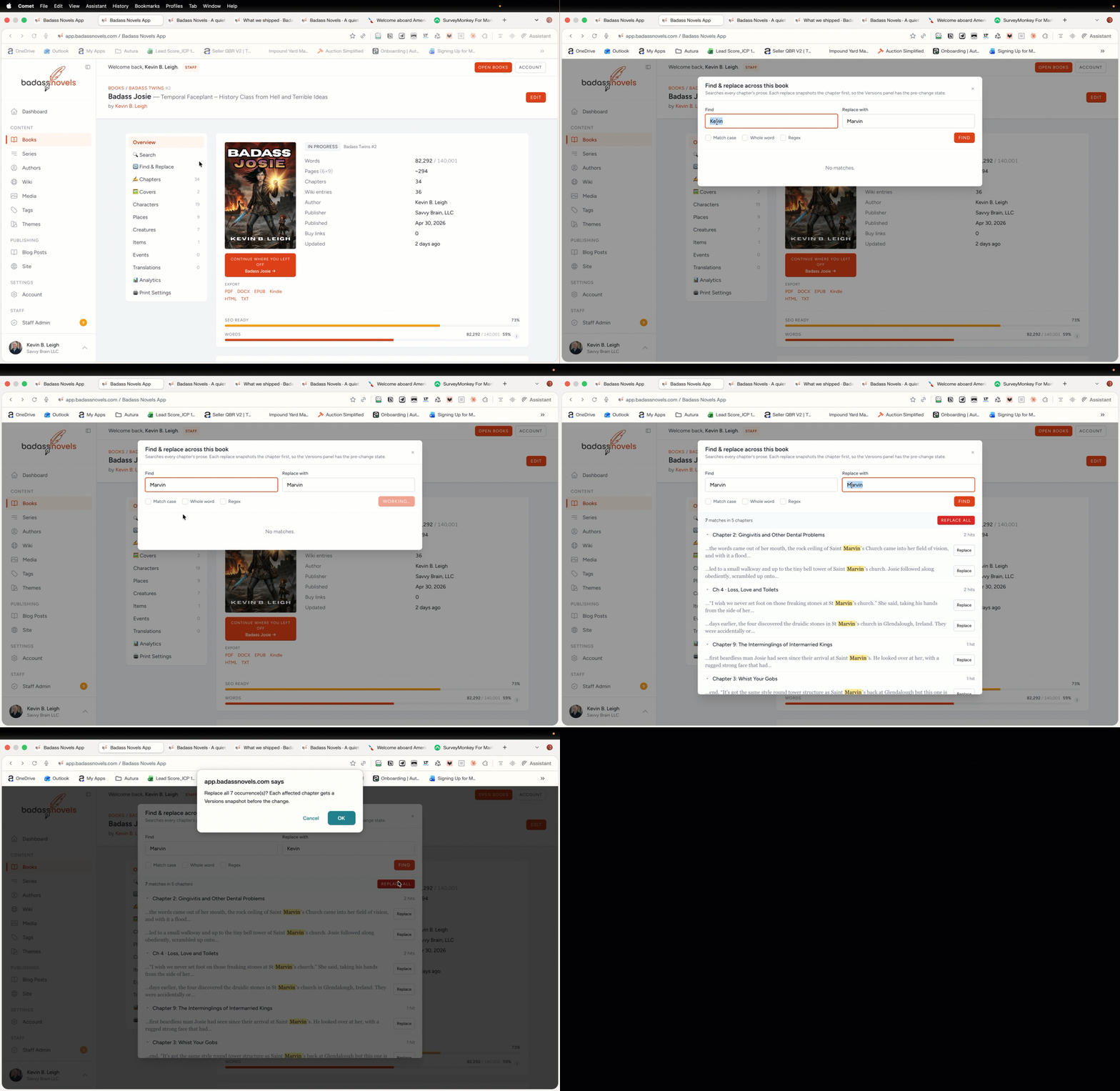
Find & Replace Across the Whole Book
Writers know the pain. You spot a repeated word, an outdated name, or a character inconsistency buried deep in chapter 12. Tab after tab? No thanks. The new global Find & Replace scans every chapter at once. It pulls up every hit with full context around it. You see exactly where your change lands before you touch a thing.
Safety First: Versions Snapshot
This is writer-grade. Not a toy. Before any replace, it snapshots a Versions copy of your book. One misclick? Hit Restore. Your work sits safe. No backups needed. No lost drafts. Just you, fixing fast.
How It Works
Open Find & Replace from the toolbar. Type your search. It indexes the full book instantly. Results show:
- Chapter and line context for each match.
- Preview of the replace in place.
- One-click apply or skip per hit.
Bulk replace? Select all and go. It processes chapter by chapter. Progress shows live. Done in seconds.[web:18]
Why Writers Need This
Tools like Scrivener search projects but replace one by one. Ulysses limits to groups. This hits the whole book. With context. With undo baked in. Polish your manuscript without the hunt.
Try it on your next pass. Search shows in the top toolbar. Your book gets cleaner every time.